Honeypots deploy realistic-looking decoy resources into your AWS account. They do nothing for legitimate workloads — their only purpose is to sit quietly until someone who shouldn't be there touches them, at which point ops0 opens an incident.
Legitimate users and services never have a reason to touch a decoy credential, decoy bucket, or decoy database. Any interaction with one is a strong signal of unauthorized access — a leaked credential being used, an attacker enumerating your account, or a compromised workload probing for lateral movement. Because decoys generate no normal traffic, alerts from them have a very low false-positive rate.
A fifth decoy — a convincing fake admin login page served over a public URL — captures any credentials submitted to it. It is configured independently in the same drawer.
| Decoy | What it deploys | Reachable over the network | On by default |
|---|---|---|---|
| Honeytoken | An IAM user and an inactive access key | No | Yes |
| Decoy storage | An S3 bucket with a bait object (database/credentials.json) | No | Yes |
| Decoy secret | A Secrets Manager secret with fake database credentials | No | Yes |
| Decoy database | A publicly reachable RDS Postgres instance with connection logging | Yes | No |
| SSH honeypot | An EC2 instance running a fake SSH server that logs credentials and commands | Yes | No |
| Fake admin panel | A Lambda Function URL serving a fake login page that captures submitted credentials | Yes | No |
The honeytoken and decoy storage/secret decoys are enabled by default since they add no network exposure. The database, SSH, and admin decoys are opt-in because they open real inbound network access to draw attackers in.
Each decoy is a set of Terraform resources (an IAM user and key, an S3 bucket, an RDS instance, an EC2 instance, or a Lambda function) gated behind a boolean enable_* variable, generated alongside the rest of your IaC.
Decoys that require network reachability (database, SSH, admin panel) run small Lambda functions or agents that phone home to ops0's ingest endpoint whenever someone connects, authenticates, or submits credentials. The honeytoken, storage, and secret decoys are detected through cloud-native event trails (e.g. a GetCallerIdentity or GetObject call against the decoy resource).
Any trip against an enabled decoy raises an incident in ops0, tagged with the decoy type, the source, and whatever was captured (attempted username, password, command, source IP).
Trips, their timestamps, and linked incidents are visible on the honeypots status board described below.
Honeypots live inside the IaC Status board, not as a separate top-level page. Opening the Honeypots control on the IaC Status board opens a side drawer with the full honeypots status board.
A previous version of ops0 had a standalone /iac/honeypots page. That URL now redirects automatically into the drawer view (/iac?honeypots=1) so old links and bookmarks keep working.
The drawer shows:
| Element | Description |
|---|---|
| Stat cards | Total honeypots, active decoys, deployed count, and trips in the last 30 days |
| Honeypot table | Name, cloud, region, tier, enabled decoys, status, and last trip time for each deployed honeypot |
| Search & filters | Filter by name/region/cloud/decoy, cloud provider, and status |
| Test trip | Send a synthetic test event against a honeypot to confirm alerting works end-to-end without waiting for a real attacker |
| View tabs | Switch between a list view, a threat map, threat intel, and an evidence view of captured incidents |
Clicking into a honeypot opens its linked incidents so you can review exactly what was captured (source IP, attempted credentials, commands run, etc.).
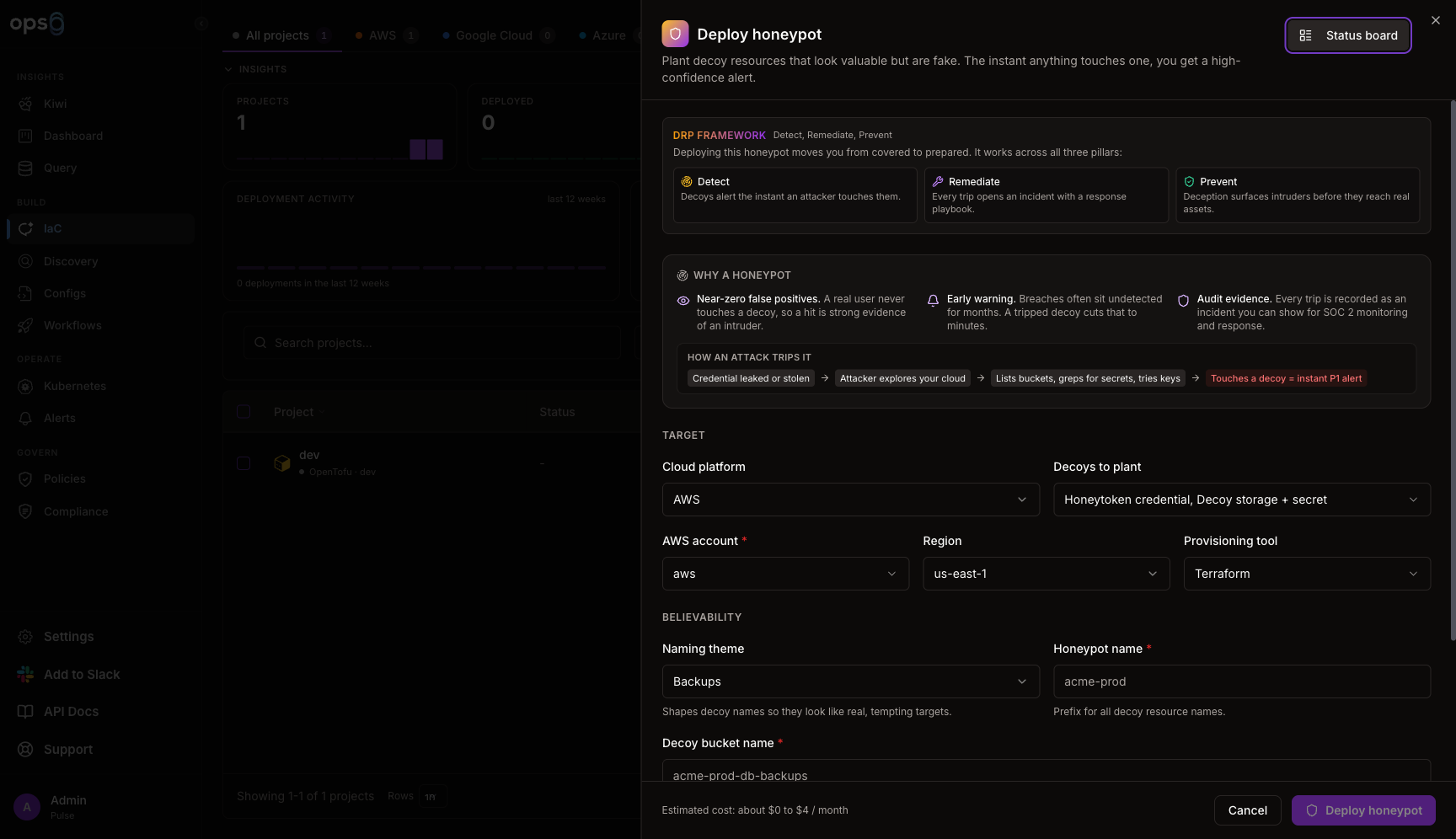
Click New honeypot from the Honeypots status board.
AWS is available today (GCP and Azure show as coming soon in the picker). Pick an AWS integration and region.
Toggle on the decoy groups you want: Honeytoken credential, Decoy storage + secret (bundled together), Decoy database endpoint, Interactive SSH, and Fake admin panel.
Pick a naming theme (e.g. Backups, Finance, Kubernetes, or Custom) that shapes believable resource names like the decoy bucket name, and set an alert severity (P1 or P2).
Select Terraform or OpenTofu as the tool used to provision the decoys.
ops0 generates the Terraform for the selected decoys and deploys it through the same pipeline used for regular IaC projects.
Each decoy contributes its own .tf file (for example honeytoken.tf, decoy_s3.tf, decoy_secret.tf, decoy_db.tf, decoy_ssh.tf, decoy_admin.tf), an enable_* boolean variable defaulting to the decoy's default-on state, and one or more Terraform outputs (for example honeytoken_access_key_id, decoy_bucket, decoy_db_endpoint, decoy_ssh_ip). Sensitive outputs, like the honeytoken's access key ID and secret access key, are marked sensitive so they are not printed in plaintext.