Define and enforce infrastructure policies across Terraform, Ansible configurations, and Kubernetes clusters. ops0 evaluates policies before every deployment, enforces Kyverno rules on clusters, and tracks violations in the compliance dashboard.
The Policies page organizes policies into tabs by infrastructure type:
| Tab | Engine | Applies to |
|---|---|---|
| IaC Policies | OPA / Rego | Terraform, OpenTofu, Oxid, CloudFormation deployments |
| Configuration Policies | OPA / Rego | Ansible configuration project deployments |
| Kubernetes Policies | Kyverno (YAML) | Kubernetes clusters at admission time |
IaC and Configuration policies share the same OPA/Rego engine. Kubernetes policies are a separate type using Kyverno YAML and are enforced by the Kyverno controller running in the cluster.
| Severity | Behavior |
|---|---|
| Error | Blocks deployment — deployment enters policy_blocked status |
| Warning | Non-blocking — violation is recorded and counted in compliance metrics |
| Info | Advisory only — shown in results but has no enforcement effect |
The blocking level configured in Settings → Compliance controls which severities actually block a deployment. For example, setting blocking level to Warning means both error and warning violations stop the apply from running.
| Category | Example Rules |
|---|---|
| Security | S3 encryption required, no public IPs on databases, security groups restricted |
| Cost | Instance size limits, no expensive instance types |
| Compliance | Resources in approved regions only, encryption at rest |
| Tagging | Required tags (Owner, Environment, CostCenter), naming conventions |
| Best Practices | Industry standards and conventions |
| Custom | User-defined policies for any scenario |
IaC policies can be scoped to a specific engine or applied to any:
| IaC Type | Description |
|---|---|
terraform | Only evaluated for Terraform projects |
opentofu | Only evaluated for OpenTofu projects |
oxid | Only evaluated for Oxid projects |
cloudformation | Only evaluated for CloudFormation projects |
any | Evaluated regardless of IaC engine (default) |
Use cloudformation scoping for policies that check AWS CloudFormation template syntax — these are evaluated against the template JSON rather than a Terraform plan.
IaC and Configuration policies run through the OPA (Open Policy Agent) execution pipeline:
input to the OPA evaluatorpackage name from the policy codeopa eval data.<package>.deny and data.<package>.warnEach Rego policy must declare a unique package name (e.g., package ops0.terraform.s3). ops0 uses this package name to query the correct rule. Policies with identical package names in the same project will collide — use descriptive, unique names.
Generate policies automatically from natural language.
Enter a prompt: "Block any S3 bucket without encryption in production accounts."
Choose the category and severity level.
ops0 produces complete Rego code or Kyverno YAML you can edit before saving.
Save the policy and assign it to projects or policy groups.
AI policy generation requires a Claude API key configured in Settings → API Configuration.
Organize policies into named groups and attach groups to projects at scale.
| Field | Description |
|---|---|
| Name | Human-readable group name |
| Type | iac, configurations, or kubernetes |
| Enabled | Toggle all policies in the group at once |
| Policies | Policies included in the group |
| Projects | Projects this group is mapped to |
A project's effective policies are the union of:
View at Policies → By Project → [select project].
When you import a compliance framework, ops0 creates a policy group containing all the framework's built-in policies. These built-in policies (marked is_builtin) cannot be edited individually, but you can edit the group name, enable/disable the group, and add or remove projects.
If you delete a framework-imported group, ops0 automatically deletes any built-in policies that belong only to that group (orphan cleanup). Built-in policies that are shared across multiple groups are not deleted.
ops0 includes a library of built-in policy templates covering common security, cost, compliance, tagging, and best-practice scenarios, organized into the same three tabs as the Policies page — Infrastructure as Code, Configurations, and Kubernetes. Import a template to create an editable copy rather than writing from scratch.
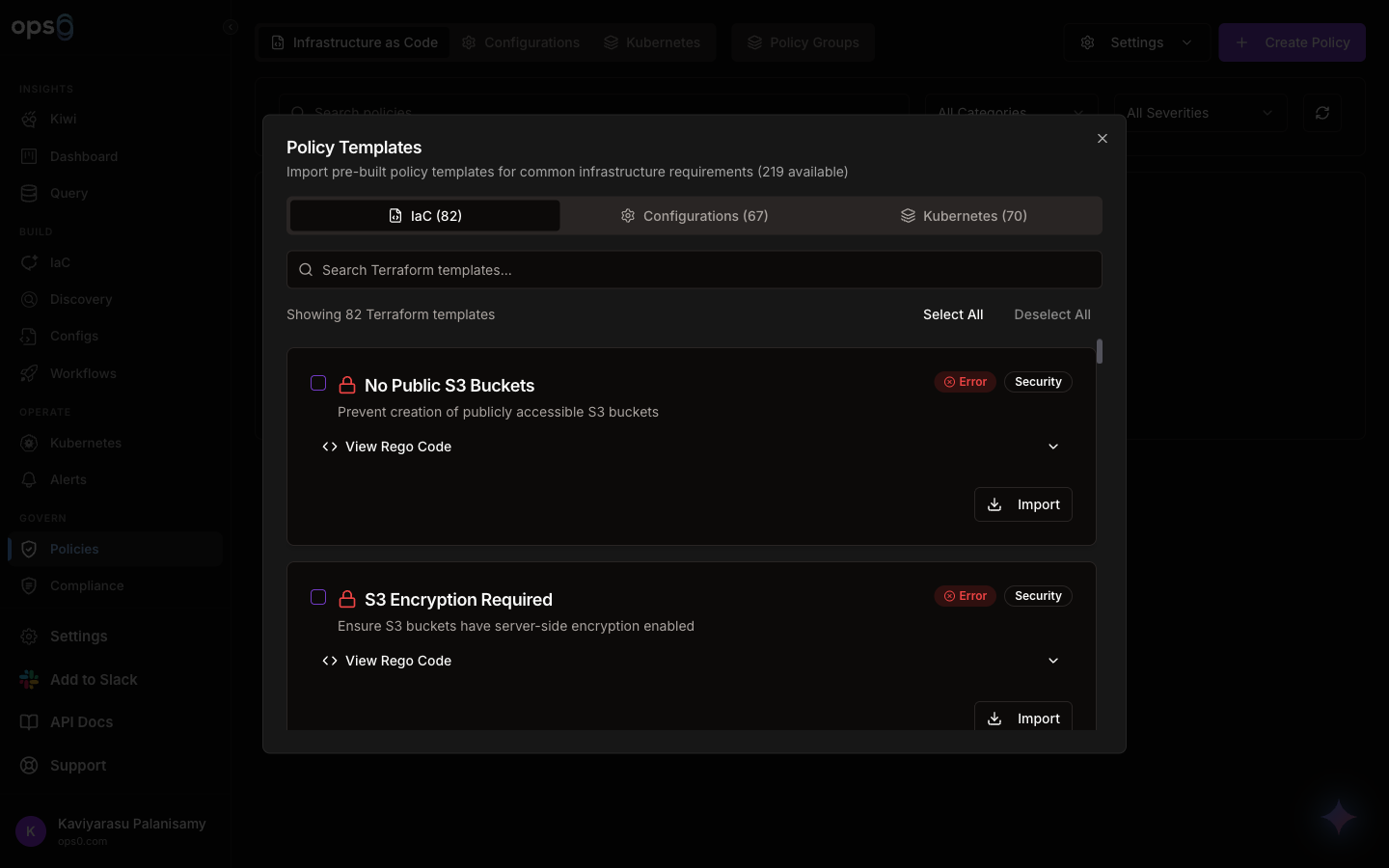
| Category | Examples |
|---|---|
| Infrastructure as Code | S3 encryption, no public access, security group rules, instance size limits, tagging requirements |
| Configurations | Ansible hardening, idempotency, and best-practice checks |
| Kubernetes | Kyverno-based pod security, resource limits, and image policy checks |
Go to Policies → Templates to view the library.
Review the Rego code and description.
Click Import to create a new editable policy from the template.
Import pre-built compliance frameworks that map industry standards to ops0 policies. Each framework contains controls with full Rego code written against the specific cloud provider's Terraform resources.
AWS (12 frameworks)
| Framework | Terraform variant | CloudFormation variant |
|---|---|---|
| CIS AWS Foundations | ✓ | ✓ |
| SOC 2 for AWS | ✓ | ✓ |
| HIPAA for AWS | ✓ | ✓ |
| GDPR for AWS | ✓ | ✓ |
| ISO 27001 for AWS | ✓ | ✓ |
| ISO 27002 for AWS | ✓ | ✓ |
Azure, GCP, Oracle Cloud (6 frameworks each)
CIS, SOC 2, HIPAA, GDPR, ISO 27001, ISO 27002 — available for each provider.
Kubernetes (3 frameworks)
| Framework | Description |
|---|---|
| CIS Kubernetes Benchmark | CIS controls for Kubernetes cluster hardening |
| NSA Kubernetes Hardening | NSA/CISA Kubernetes Hardening Guidance |
| Pod Security Standards (PSS) | Kubernetes Pod Security Standards |
Configuration Management (2 frameworks)
| Framework | Description |
|---|---|
| CIS Ansible Benchmark | CIS controls for Ansible configuration hardening |
| STIG Ansible | DISA STIG compliance checks for Ansible |
AWS frameworks have separate Terraform and CloudFormation variants. The CloudFormation variant evaluates policies against CloudFormation template JSON instead of a Terraform plan. Select the correct variant when importing based on your IaC engine.
Go to Policies → Frameworks and select your cloud provider or platform.
Review the framework's controls and each mapped Rego policy.
Importing creates a policy group with all framework policies pre-configured. Map that group to your projects to start enforcing.
For Kubernetes clusters, ops0 supports Kyverno policies written in YAML. Kyverno runs in the cluster and enforces policies at Kubernetes admission time.
| Feature | Description |
|---|---|
| Create / Import | Write Kyverno YAML or import from templates |
| Cluster Mapping | Map policies to specific Kubernetes clusters |
| Enforcement Modes | Enforce (block violations) or Audit (log only) |
| Toggle | Enable/disable individual policies |
| Validation | Syntax validation before deployment |
The Policy Diagnostics modal shows Kyverno health on a cluster: installation status, deployed policies, enforcement modes, and webhook status.
View a full log of all policy evaluations across all projects at Policies → Check History:
package ops0.terraform.s3

deny[msg] {
    resource := input.planned_values.root_module.resources[_]
    resource.type == "aws_s3_bucket"
    not resource.values.server_side_encryption_configuration

    msg := sprintf(
        "S3 bucket '%s' must have encryption enabled",
        [resource.values.bucket]
    )
}
Policy Evaluation
─────────────────────────────────────
✗ FAILED — S3 Encryption Required (Error)

Violations:
  • S3 bucket 'company-data-bucket' must have encryption enabled

Deployment blocked. Fix violations and retry.

