Configure when and how workflows run. Each workflow has a single trigger type set on the workflow itself.
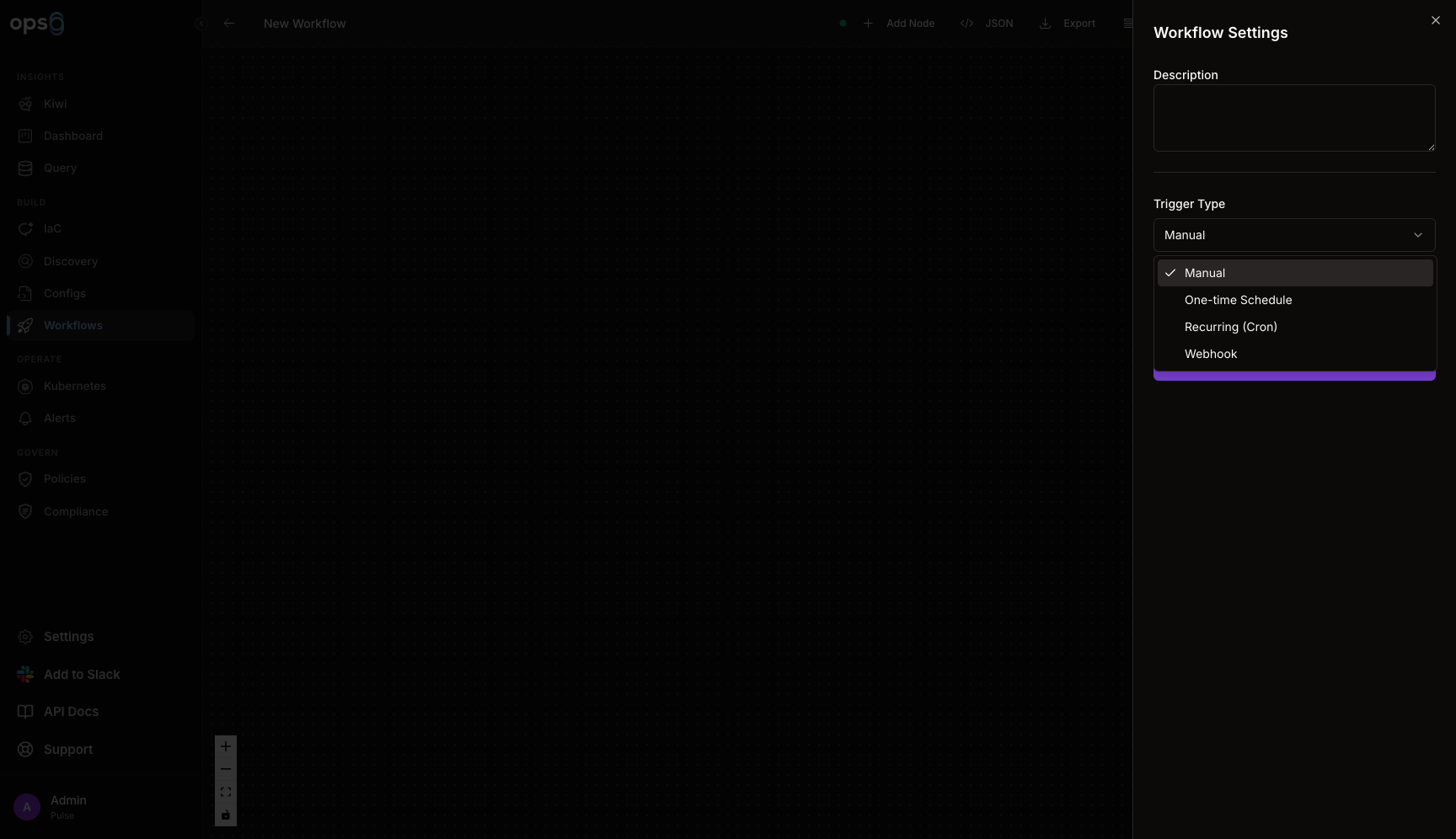
Always enabled. Users can run workflows on-demand.
| Field | Description |
|---|---|
| Require Inputs | Prompt for variables when running |
| Input Schema | Define input fields |
Input Schema Example:
{
  "environment": {
    "type": "select",
    "required": true,
    "options": ["dev", "staging", "prod"]
  },
  "version": {
    "type": "string",
    "required": true
  }
}
Run a workflow once at a specific date and time. Useful for a planned maintenance window or a one-off deploy.
| Field | Required | Description |
|---|---|---|
| Date | Yes | Calendar date to run |
| Time | Yes | Hour and minute to run |
Run workflows repeatedly on a schedule using a cron expression.
| Field | Required | Description |
|---|---|---|
| Cron Expression | Yes | Standard cron syntax |
┌───────────── minute (0-59)
│ ┌───────────── hour (0-23)
│ │ ┌───────────── day of month (1-31)
│ │ │ ┌───────────── month (1-12)
│ │ │ │ ┌───────────── day of week (0-6)
│ │ │ │ │
* * * * *
| Schedule | Cron | Description |
|---|---|---|
| Every hour | 0 * * * * | At minute 0 |
| Daily at 2am | 0 2 * * * | 2:00 AM |
| Every Monday | 0 0 * * 1 | Monday midnight |
| Every 15 min | */15 * * * * | Quarter hour |
| Weekdays 9am | 0 9 * * 1-5 | Mon-Fri |
Trigger workflows via HTTP POST requests from external systems like GitHub Actions, GitLab CI, monitoring tools, or custom applications. This is also how you trigger a workflow on a Git push — wire up a webhook call from your CI pipeline.
| Field | Description |
|---|---|
| URL | Auto-created webhook endpoint |
| Secret | Authentication token for request validation |
| Payload Mapping | Map JSON fields to workflow variables |
| IP Whitelist | Optional IP restriction for security |
Open your workflow and click Triggers tab.
Toggle "Webhook" trigger on.
ops0 provides a unique endpoint:
https://api.ops0.io/webhooks/wf_abc123def456/trigger
Secret automatically created for authentication:
whsec_abc123def456ghi789jkl012mno345
URL Format:
wf_abc123def456 - Workflow-specific identifierRotate secret token for security:
Navigate to workflow triggers configuration.
Creates a new random secret token.
Replace old secret in all calling systems (GitHub, GitLab, etc.).
Verify webhook calls work with new secret.
Old secret stops working immediately after regeneration. Update all webhook callers before regenerating to avoid failed triggers.
When to Regenerate:
All webhook requests must include secret token in header:
Required Header:
X-Webhook-Secret: whsec_abc123def456ghi789jkl012mno345
Example Request:
curl -X POST \
  -H "X-Webhook-Secret: whsec_abc123def456ghi789jkl012mno345" \
  -H "Content-Type: application/json" \
  -d '{"version": "1.2.3", "environment": "prod"}' \
  https://api.ops0.io/webhooks/wf_abc123def456/trigger
Response (Success):
{
  "status": "triggered",
  "workflow_id": "wf_abc123def456",
  "execution_id": "exec_xyz789",
  "message": "Workflow started successfully"
}
Response (Failed Auth):
{
  "status": "error",
  "code": "INVALID_SECRET",
  "message": "Webhook secret is invalid"
}
Map JSON fields from webhook payload to workflow variables:
Incoming Payload:
{
  "version": "1.2.3",
  "environment": "production",
  "commit": {
    "sha": "a1b2c3d4",
    "author": "john@company.com",
    "message": "Fix critical bug"
  },
  "build": {
    "id": "12345",
    "status": "success"
  }
}
Payload Mapping Configuration:
| JSON Path | Workflow Variable Name |
|---|---|
$.version | version |
$.environment | env |
$.commit.sha | commit_sha |
$.commit.author | author |
$.build.id | build_id |
Access in Workflow Steps:
steps:
  - name: deploy
    run: |
      echo "Deploying version ${trigger.payload.version}"
      echo "To environment: ${trigger.payload.env}"
      echo "Commit: ${trigger.payload.commit_sha}"
      echo "Build: ${trigger.payload.build_id}"
Restrict webhook calls to specific IP addresses:
In webhook settings, toggle "Restrict by IP".
Enter CIDR blocks:
192.168.1.0/24
203.0.113.50/32
Requests from other IPs will be rejected with 403.
Common IP Ranges:
| Service | IP Ranges |
|---|---|
| GitHub Actions | GitHub Meta API - actions field |
| GitLab CI | GitLab IP ranges |
| Jenkins | Your Jenkins server IP |
| CircleCI | CircleCI IPs |
Test webhook integration before deploying:
In webhook settings, click Test Webhook.
Enter JSON payload to test:
{
  "version": "1.0.0-test",
  "environment": "staging"
}
Workflow starts with test payload. Check execution logs.
Confirm variables populated correctly from payload.
Command-Line Testing:
# Test from terminal
curl -X POST \
  -H "X-Webhook-Secret: your_secret_here" \
  -H "Content-Type: application/json" \
  -d '{"version": "test", "environment": "dev"}' \
  https://api.ops0.io/webhooks/wf_abc123/trigger

# Expected response
{"status":"triggered","execution_id":"exec_test123"}
Store webhook secret in GitHub Secrets, GitLab CI/CD Variables, or environment variable manager. Never commit secrets to version control.
ops0 webhooks are HTTPS-only. Never use HTTP webhook endpoints (not supported).
Use payload mapping to validate required fields. Workflow fails if mapped fields are missing from payload.
Enable IP whitelisting for production webhooks to prevent unauthorized trigger attempts.
View webhook request history and debug failed requests:
Webhook Log Columns:
| Column | Description |
|---|---|
| Timestamp | When request received |
| Source IP | Caller IP address |
| Status | Success, Auth Failed, or Error |
| Payload Size | Request body size |
| Execution ID | Triggered workflow execution (if successful) |
Failed Request Details:
Webhook Request Failed
─────────────────────────────────────
Time:         2024-01-15 14:30:22 UTC
Source IP:    203.0.113.45
Status:       401 Unauthorized
Reason:       Invalid webhook secret
Payload:      {"version": "1.2.3", ...}

Expected secret header:
  X-Webhook-Secret: whsec_...

Received header:
  X-Webhook-Secret: old_secret_123
GitHub Workflow Example:
name: Trigger ops0 Deployment
on:
  push:
    branches: [main]

jobs:
  deploy:
    runs-on: ubuntu-latest
    steps:
      - name: Trigger ops0 Workflow
        run: |
          curl -X POST \
            -H "X-Webhook-Secret: ${{ secrets.OPS0_WEBHOOK_SECRET }}" \
            -H "Content-Type: application/json" \
            -d '{
              "version": "${{ github.sha }}",
              "environment": "production",
              "commit": {
                "sha": "${{ github.sha }}",
                "author": "${{ github.actor }}",
                "message": "${{ github.event.head_commit.message }}"
              }
            }' \
            https://api.ops0.io/webhooks/wf_abc123/trigger
Setup:
OPS0_WEBHOOK_SECRETmain branch triggers deploymentCheck: Webhook trigger enabled, correct URL, valid secret, IP not blocked.
Fix: Review webhook logs for error details. Test with curl command.
Cause: Invalid or missing X-Webhook-Secret header.
Fix: Copy current secret from workflow settings. Update calling system.
Cause: IP whitelist enabled and caller IP not allowed.
Fix: Add caller IP to whitelist or disable IP restriction.
Cause: Payload mapping missing required fields or workflow step error.
Fix: Check execution logs. Verify payload structure matches mapping configuration.
Trigger:       Webhook
Called from:   GitHub Actions on push to main
Path Filter:   terraform/**
┌─────────┐    ┌──────────┐    ┌─────────┐    ┌────────┐
│  Plan   │───▶│ Approval │───▶│  Apply  │───▶│ Notify │
└─────────┘    └──────────┘    └─────────┘    └────────┘
Repository:  acme/infrastructure
Branch:      main
Commit:      a1b2c3d
Author:      jane@example.com
Message:     "Add new RDS instance"
Files:
  - terraform/rds.tf (modified)
  - terraform/variables.tf (modified)
Workflow: infrastructure-deploy
Run ID:   wfr_xyz789
Status:   Running

Triggered By: Webhook
  Branch:  main
  Commit:  a1b2c3d
  Author:  jane@example.com

Steps:
  1. Plan         ▶ Running
  2. Approval     ○ Pending
  3. Apply        ○ Pending
  4. Notify       ○ Pending
Trigger:   Recurring (Cron)
Cron:      0 3 * * *
Variables:
  backup_type: full
  retention_days: 30
Schedule: Daily at 3:00 AM
─────────────────────────────────────
Next 5 runs:
  1. Tomorrow    3:00 AM
  2. Wed Jan 8   3:00 AM
  3. Thu Jan 9   3:00 AM
  4. Fri Jan 10  3:00 AM
  5. Sat Jan 11  3:00 AM
Use the K8s Incidents step type inside a manually or cron-triggered workflow to gate downstream steps on active incidents matching your severity/cluster filters, then respond automatically.
| Step | Type | Configuration |
|---|---|---|
| 1 | K8s Incidents | Clusters: production-eks, Severities: Critical, High |
| 2 | Script | Restart deployment via kubectl |
| 3 | HTTP Request | Health check |
| 4 | Approval Gate | Notify via Slack, wait for confirmation |
Incident:  INC-2024-0147
Type:      OOMKilled
Severity:  Critical
Cluster:   production-eks
Namespace: api
Pod:       api-gateway-7d9f8c6b4d-2xkjp

Triggered Workflow: incident-response
Run ID: wfr_inc147

