Store SSH private keys in ops0 for server authentication. ops0 encrypts every key at rest, verifies them by fingerprint, and uses them across Ansible deployments and server connections.
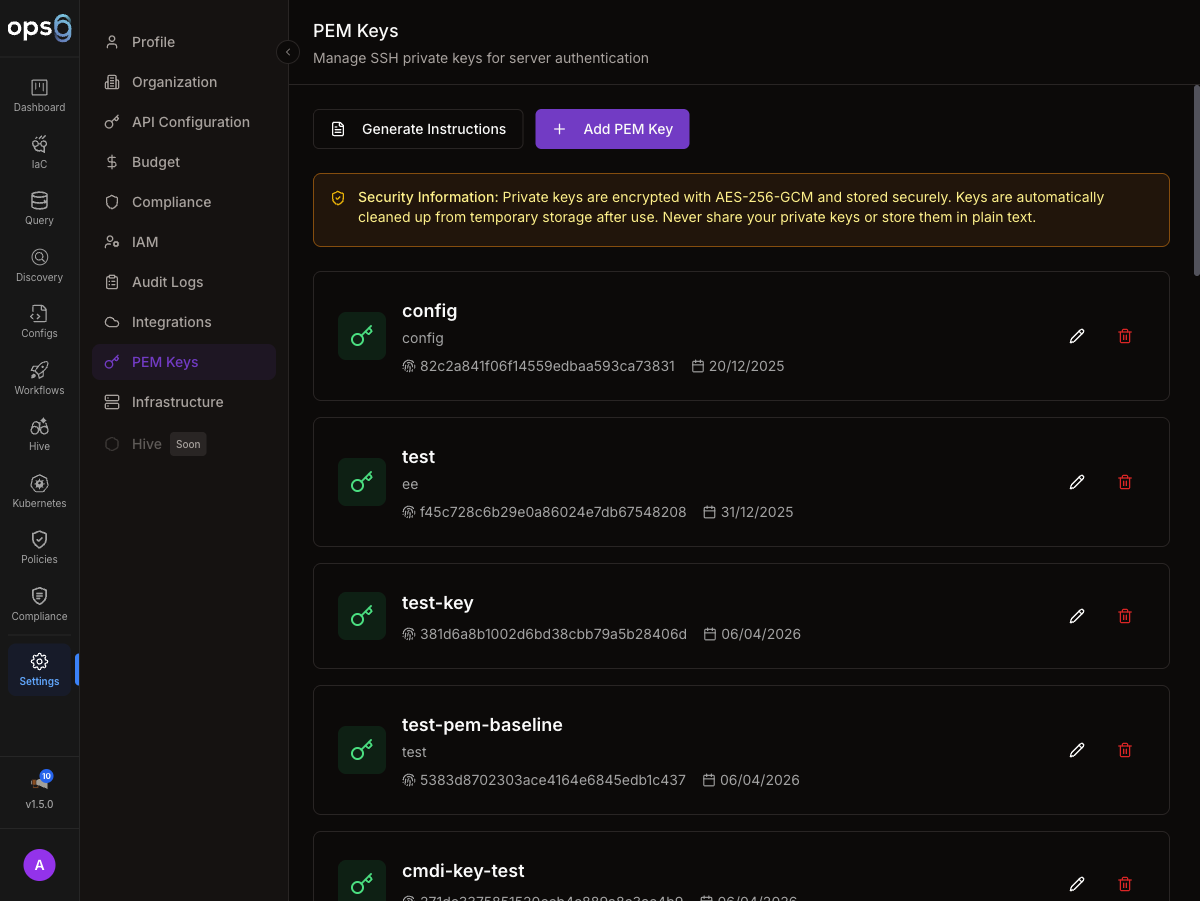
PEM keys are SSH private keys stored securely in ops0. ops0 uses them to authenticate when connecting to your servers for:
ops0 never transmits the raw private key to the browser after upload. The key is stored encrypted and only decrypted server-side at the moment an SSH connection is made.
Go to Settings → PEM Keys.
Click Add PEM Key in the top-right corner.
Provide a Key Name (e.g., "Production Servers" or "eu-west-1 Auto-Scaling Group").
Optionally add a Description to give your team context — for example, "eu-west-1 production servers" or "staging auto-scaling group". The description is visible to all org members with access to Settings.
Either upload your .pem file directly or paste the private key content into the text field. The key must begin with -----BEGIN ... PRIVATE KEY-----.
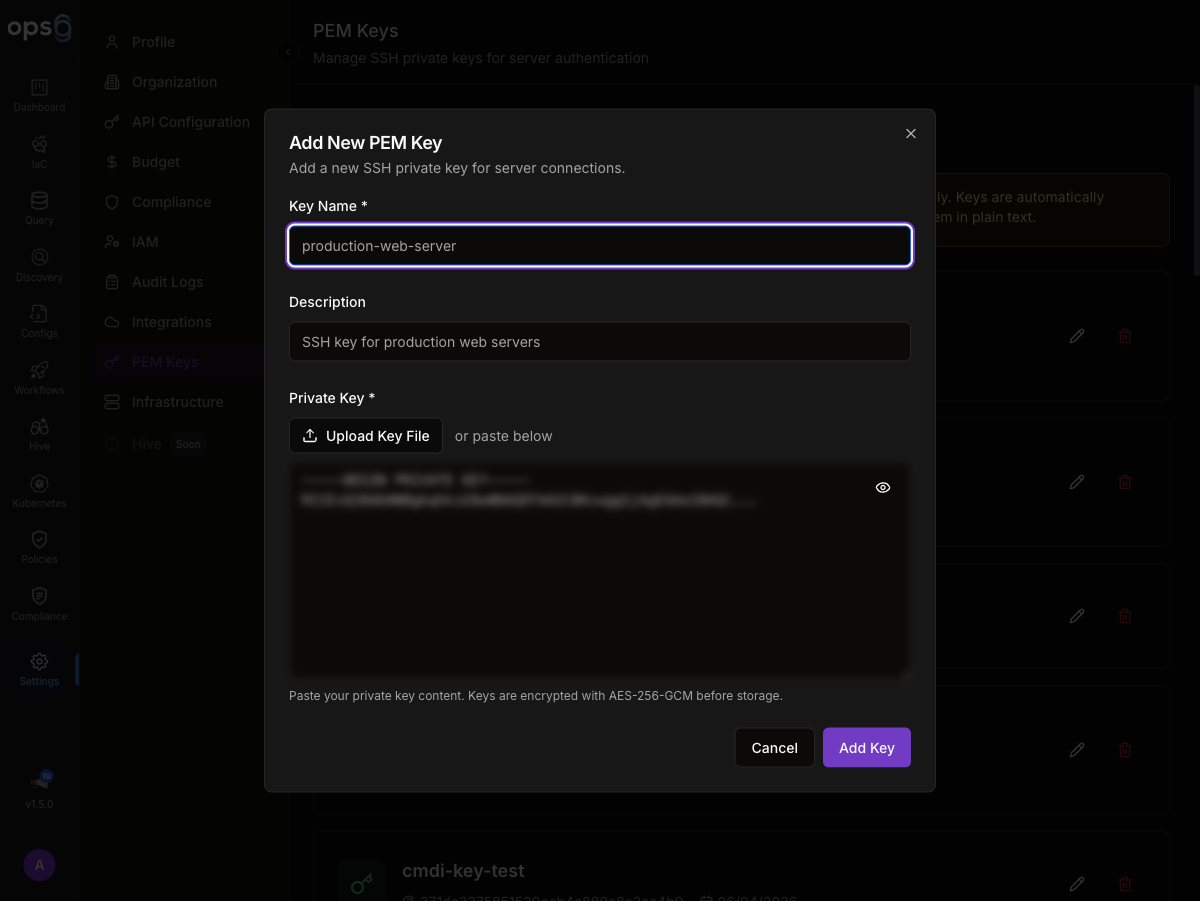
Click Save to securely store the key. ops0 encrypts it immediately and displays the SHA-256 fingerprint for verification.
After saving, each key entry shows the following fields:
| Field | Description |
|---|---|
| Name | The label you gave the key |
| Description | Optional context notes |
| Fingerprint | SHA-256 hash of the public key, auto-calculated from the uploaded private key |
| Created | When the key was uploaded |
| Last Used | Most recent time ops0 used this key for a connection |
The SHA-256 fingerprint lets you verify which key is stored without exposing the private key itself. To confirm a match, run the following against your local copy of the key:
ssh-keygen -l -E sha256 -f your-key.pem
The output should match the fingerprint shown in ops0.
PEM keys are referenced in three places across ops0:
Ansible / Configurations — when running a playbook, select the PEM key to use for SSH authentication to target servers. This is configured per Ansible project or per individual run.
Server Groups — set a default PEM key for all servers in a group so you do not need to select it individually for each server. Servers in the group inherit the group's default key unless overridden at the server level.
You cannot edit or overwrite an uploaded key in place. To replace a key:
Add the new key with a distinct name, such as "Production Key v2".
Go to every server connection and Ansible project that references the old key and switch it to the new key.
Once all references are updated, delete the old key from the PEM Keys list.
Deleting a PEM key removes it from ops0 permanently. Any server connection or Ansible project still referencing the deleted key will fail to connect until updated to use a different key.
If your organization rotates its master encryption key (the key ops0 uses to encrypt stored PEM keys), existing PEM keys need to be re-encrypted under the new master key. ops0 provides a migration endpoint for this.
MASTER_ENCRYPTION_KEY environment variable in the ops0 deploymentContact your ops0 administrator or use the ops0 admin API to trigger key re-encryption. The migration decrypts each PEM key with the old master key and re-encrypts it with the new one. The private key content is not exposed or exported during this process.
Key migration requires organization Owner or platform Admin access. The operation is logged in Audit Logs.
After migration, verify the key still works by clicking Test Key on any PEM key entry. This runs a connection test to a server that uses the key, confirming the key can be decrypted and used successfully.
| Format | Supported |
|---|---|
| RSA (PKCS#1, PKCS#8) | Yes |
| Ed25519 | Yes |
| ECDSA | Yes |
| DSA | No — deprecated, not supported |
| Password-protected keys | No — passphrase-protected keys are not supported |
If your key is passphrase-protected, remove the passphrase before uploading:
ssh-keygen -p -f your-key.pem
Enter the existing passphrase when prompted, then leave the new passphrase blank and press Enter.

